Thunderbolt: You May Be Doing it Wrong
Not all USB-C cables are Thunderbolt and not all Thunderbolt is the same. Do you know the difference?
Thunderbolt! It’s Lightning Fast, Right? (Not Always)
USB-C is Not Thunderbolt
Too often this causes confusion among the consumer market, and if you open YouTube and type in “USB-C” there will be plenty of people talking for at minimum 5 minutes about the differences. So let’s save a little time and get to the point. USB-C is a type of connector, while Thunderbolt is a technology that can use the USB-C connector. Not all USB-C cables support Thunderbolt, and not all Thunderbolt devices use USB-C connectors. Just because you have a USB-C cable doesn’t mean it supports Thunderbolt speeds or features.
Thunderbolt Technology is a Certification/Standard, Not a Specific Product
Thunderbolt is a technology introduced by Intel in collaboration with Apple. It is a high-speed data transfer protocol that can support multiple types of data, including video, audio, and power delivery. It is designed to provide fast data transfer speeds and versatile connectivity options. However, not all devices that use Thunderbolt technology are the same. There are different versions of Thunderbolt (Thunderbolt 1, 2, 3, 4, and as of 2023, Thunderbolt 5), each with its own specifications and capabilities. When you see a device labeled as “Thunderbolt,” it’s important to check which version it supports to understand its capabilities.
Thunderbolt was not always using the USB-C connector. Thunderbolt 1 and 2 used the Mini DisplayPort connector, while Thunderbolt 3 and beyond (at the time of writing) use the USB-C connector. This means that if you have a Thunderbolt 1 or 2 device, it will not be compatible with USB-C cables or ports without an adapter. Conversely, Thunderbolt 3 and 4 devices can use USB-C connectors, but they may not support all the features of Thunderbolt if connected to a non-Thunderbolt USB-C port.
USB-C stands for “Universal Serial Bus Type-C” and is a reversible connector that can support various protocols, including USB 3.1, USB 3.2, and Thunderbolt 3 and 4. However, the presence of a USB-C connector does not guarantee that the device supports Thunderbolt technology. Always check the specifications of the device to confirm whether it supports Thunderbolt and which version it uses. With the adoption of the USB-C connector across phones, laptops, and peripherals, it has become a common standard for connectivity. Usually this means your mouse is not a Thunderbolt device. That USB-C port on your laptop? It can be anything at this point.
How Do You Know if Your Device Supports Thunderbolt?
Per industry standards, reputable manufacturers will label their products clearly if they support Thunderbolt technology. Look for the Thunderbolt logo (a lightning bolt) on the device or in the product specifications. The logo itself is hard to miss in some instances, but if you look at the side of your ultralight laptop it hardly has room for any labels, so look closely around the USB-C port. If you don’t see the lightning bolt, it’s not a Thunderbolt port.
Take a look at this diagram from Intel: “One Thunderbolt(TM) port; Everything USB-C can do, and more!”
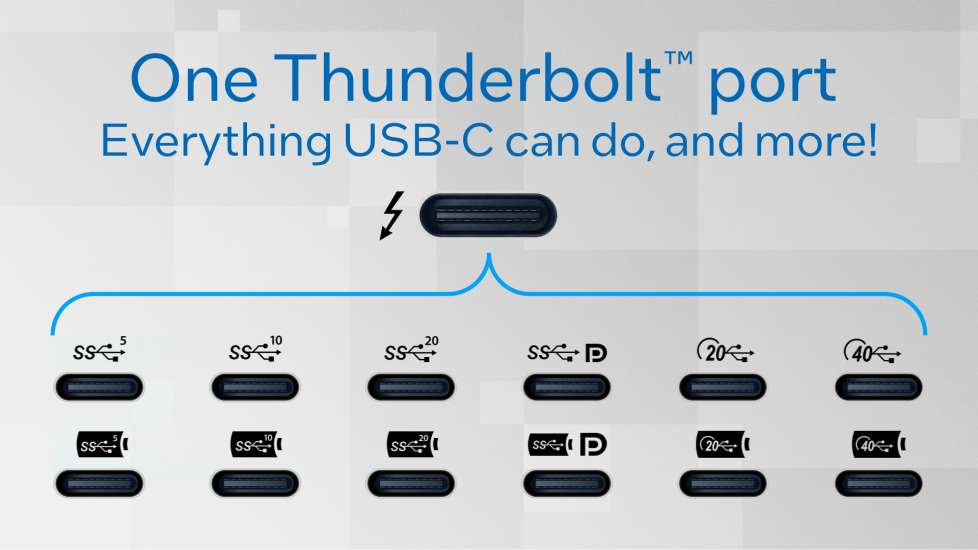
The SS symbol stands for SuperSpeed, which originated with USB 3.0 and carried through the entire USB 3.x family. That SS symbol comes with 5, 10, 20, or DP. All of these mean something different: 5 = 5 Gbps, 10 = 10 Gbps, 20 = 20 Gbps, DP = DisplayPort. If you see a USB-C port with the SS symbol and a number, it means it supports that specific USB speed, not Thunderbolt.
SS encased in a battery still stands for SuperSpeed, but it also indicates that the port supports power delivery, which is a feature of USB-C. This type of port can handle higher power demands, so this is the one to use for your portable monitor or charging your peripherals while transferring data. Again, this is not Thunderbolt.
The number 20 with the USB icon indicates USB 3.2 Gen 2x2, which tops out at 20 Gbps. The number 40 with the USB icon indicates USB4 Gen 3, which reaches 40 Gbps. These are two different standards. Both are fast, both are not Thunderbolt, and both come in a battery icon variant indicating power delivery as well.
If you see those individual labels on a port, that’s the demystification of the port.
Thunderbolt encompasses all of those features over one single cable.